Share a chart without sharing the spreadsheet
Some numbers are for everyone and some are not. You want a client to see what they spent by month, not every line of your costs. You want the team to see headcount by department, not salaries. The usual answer is a screenshot, which is out of date the moment it is taken.
How to do it
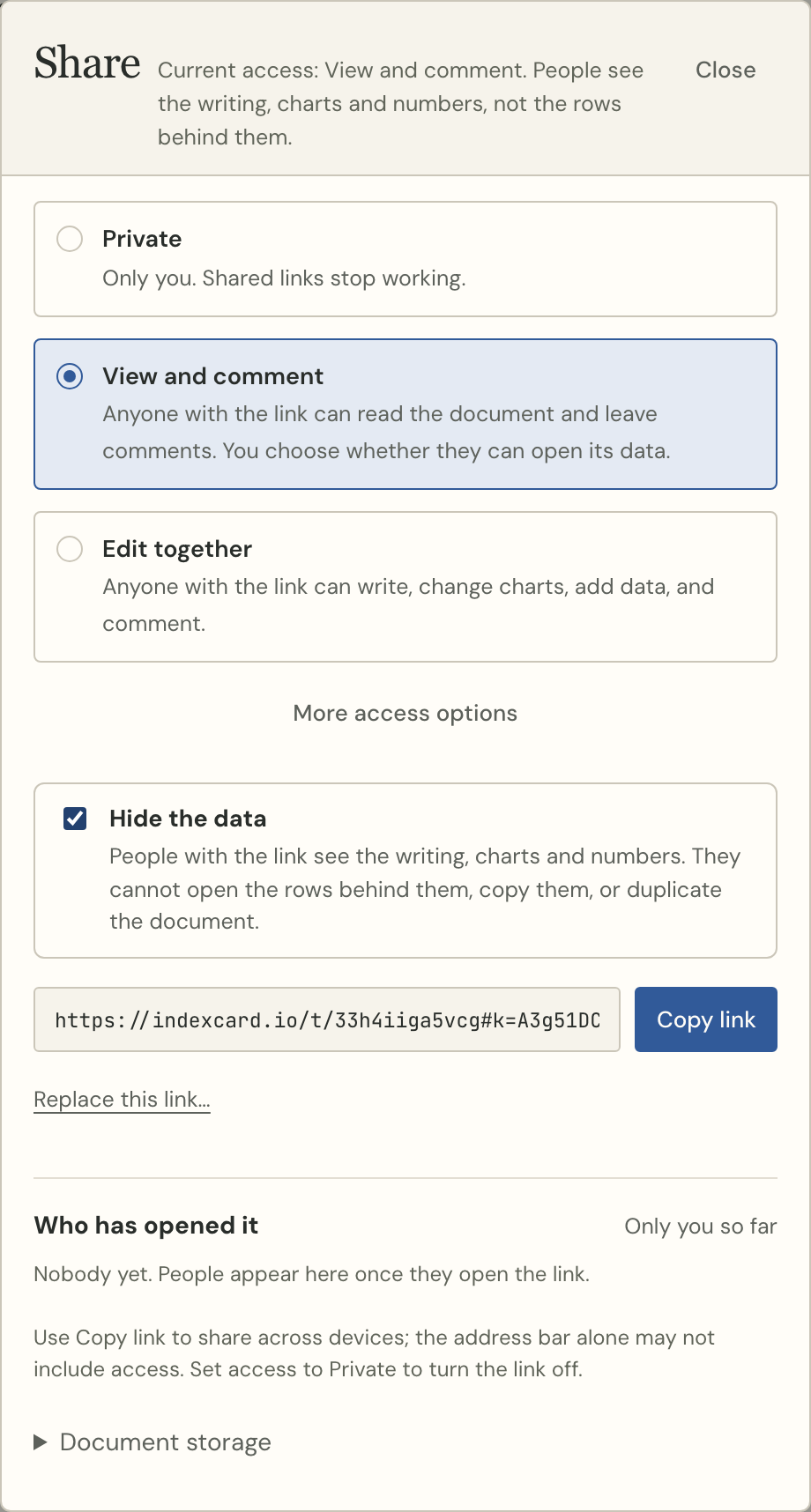
- Open the card and press Share.
- Choose View and comment.
- Tick Hide the data.
- Copy the link and send it.
What the reader gets
They see the writing, the charts and any number you put in a sentence, and they can leave comments. They cannot open the rows behind a chart, see the data table, copy it, or duplicate the card. That is enforced by the server, not by hiding buttons: a reader asking for the rows directly is refused.
The chart still has the numbers it draws — a bar is a number — so hide the data when the rows are private, not when the totals are.
When you want the opposite
Leave it unticked and readers can open the table behind every chart, which is the point when you are showing your work to a colleague. An Explore data link goes further and lets them ask their own questions.
Either way it stays live: when the data changes, the link shows the new numbers. Nobody has to be sent a new file.
Try it with your own numbers
Paste a table, ask a question, and put the answer in a sentence. Free to start, no account needed.